Practical guides on generating game-ready 3D monsters and dropping them into your engine — plus what's new in Gobkit.
2026-10-13 · by Ariescar
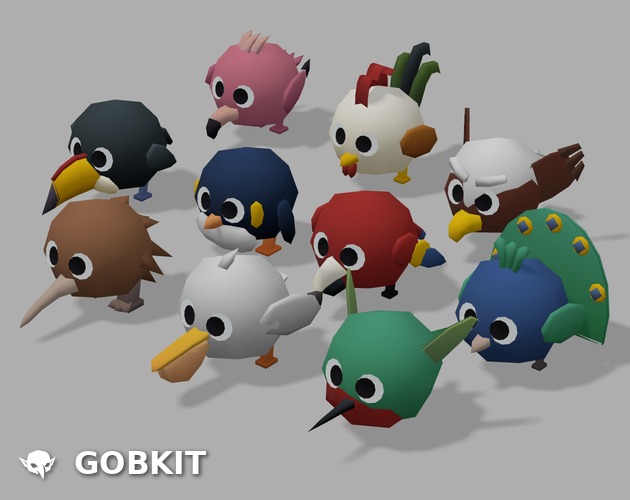
I made ten birds this batch. Eagle, Flamingo, Hummingbird, Kiwi, Macaw, Peacock, Pelican, Penguin, Rooster and a Toucan.
They're yours. Free, CC0, no credit needed. Take them, ship them, sell what you make. No strings.
Plain .glb, so you just load one and it works. Idle, walk, attack and death are already in each file as separate named clips, so you play the one you want by name.
I'm doing these in batches, slowly working through every animal I can think of so people can build their own ecosystems. Minions, animals and dinosaurs are already out, birds are this one. That's 246 rigged characters on the free shelf now.
If you work with an agent it can pull the whole shelf from gobkit.com/api/free. Or grab them by hand at gobkit.com/freebies.
2026-10-13 · by Ariescar
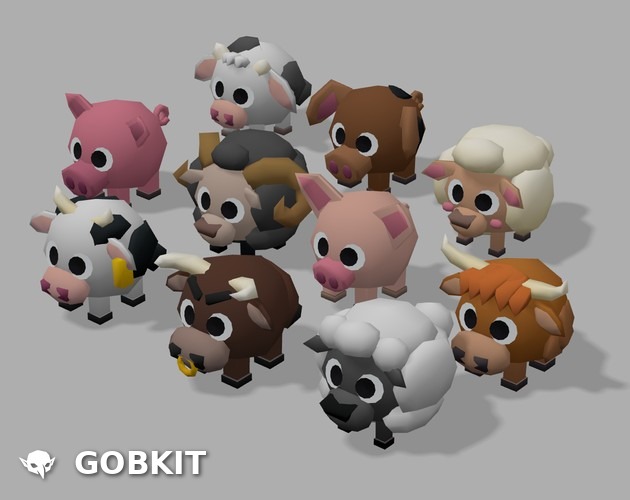
I made ten farm animals this batch. BlackSheep, Bull, Calf, HighlandCow, HolsteinCow, Lamb, Pig, Piglet, Sheep and a SpottedPig.
They're yours. Free, CC0, no credit needed. Take them, ship them, sell what you make. No strings.
Plain .glb, so you just load one and it works. Idle, walk, attack and death are already in each file as separate named clips, so you play the one you want by name.
I'm doing these in batches, slowly working through every animal I can think of so people can build their own ecosystems. Minions, animals, birds and dinosaurs are already out, farm animals are this one. That's 246 rigged characters on the free shelf now.
If you work with an agent it can pull the whole shelf from gobkit.com/api/free. Or grab them by hand at gobkit.com/freebies.
2026-08-22 · by Ariescar
A download button gives a person a zip. A manifest gives a program the model URLs, the frame ranges inside each animation, and the conventions the files were authored under, so the integration is written once and re-run whenever a pack changes. That is what /api/free is for: these assets are meant to be loaded by code, and code needs the metadata more than it needs the archive.
What the endpoint returns
One GET, no key, no proxy. The response carries a top-level usage block written for whoever is doing the integration, and a packs array where each pack holds its own models. A single entry from packs[].models[], abbreviated:
{
  "id": "minion-a01",
  "url": "https://gobkit.com/freebies/minion/minion-a01.glb",
  "rigged": true,
  "fps": 24,
  "animations": [
    { "name": "idle",   "from": 0,  "to": 29 },
    { "name": "attack", "from": 30, "to": 59 },
    { "name": "dead",   "from": 60, "to": 89 }
  ],
  "license": "CC0 1.0 (public domain)"
}
Everything a loader needs is in that object: where the binary lives, whether it is rigged, the authoring frame rate, and the named ranges inside the timeline.
Why the frame ranges are the point
Update (13 October 2026): the files now ship separate named clips (idle, attack, dead, walk). Play them by name with THREE.AnimationClip.findByName(gltf.animations, 'walk'); the frame-range slicing described below no longer applies.
Each rigged GLB ships one animation clip with every action laid end to end, not one clip per action. That keeps the file count low and survives exporters that quietly drop clip names, but it means any viewer that can only press play will run idle, attack and death as a single take. In three.js you slice it instead:
const gltf  = await new GLTFLoader().loadAsync(model.url);
const master = gltf.animations[0];                                  // one timeline per rigged GLB
const idle  = THREE.AnimationUtils.subclip(master, 'idle', 0, 30, model.fps);  // to + 1
const unit  = SkeletonUtils.clone(gltf.scene);                      // NOT gltf.scene.clone()
const mixer = new THREE.AnimationMixer(unit);
mixer.clipAction(idle).play();
scene.add(unit);
The end frame is passed as to + 1 because the upper bound of subclip is exclusive; handing it the raw to value silently drops the last frame, which reads as a small hitch every time the loop wraps. The frame rate comes from the manifest rather than being hardcoded, so a pack authored at a different rate does not require the calling code to change.
Cloning a skinned mesh
Line four is the one that costs an afternoon. These models are skinned, so the mesh holds references into a skeleton, and scene.clone() duplicates the mesh while leaving those references pointing at the original bones. Nothing throws. The second unit simply stands in bind pose, or folds into the origin, while the first one animates correctly. SkeletonUtils.clone() rebuilds the bone graph and rebinds the skin, which is why the manifest states the caveat in usage.animation rather than leaving it to be rediscovered under deadline.
Conventions stated instead of guessed
The same usage block pins down what is otherwise reverse-engineered by loading a file and staring at it: facing is +Z with up +Y, units are meters, and there is no Draco or Meshopt compression, so no decoder has to be registered with the loader. The facing note exists for a specific reason. Look-at helpers already aim local +Z at their target, so adding a defensive 180-degree turn on top double-compensates and produces units that walk backwards.
Licence and access
All 287 models are CC0 1.0: commercial use is fine, no attribution is required, and there is no account and no API key to obtain them. The endpoint is open and CORS is unrestricted, so a page can call it from the browser directly.
One caveat on hotlinking
The URLs in the manifest are fine to load straight from a prototype or a demo page. For anything shipped, download the pack and bundle the files into the project. CC0 permits redistribution, and a bundled copy means the build carries no runtime dependency on this site being reachable. Treat the manifest as a build-time index, not a CDN.
What it replaces
Before the manifest, dropping a pack into a scene meant opening a page, reading a table of frame ranges, and retyping the numbers into source. Those numbers then rotted quietly the next time a pack was re-exported. Reading them at build time removes the copy, and the page and the API cannot drift apart, because both are generated from the same data file.
2026-08-17 · by Ariescar
As a 3D Generalist & Technical Artist in game industry, I've been obsessed with one question: how do we engineer subjective "aesthetics"?
Aesthetics have an objective baseline (acting as hard constraints) and a subjective style (like my preferred low-poly or cel-shaded, acting as stylistic LoRAs). anyCreature 1.2.0 is an automated testing pipeline (Harness) built to execute this exact philosophy.
1. QC Thresholds — the 60-point baseline
We must turn 3D fundamentals into strict QC thresholds. The system automatically intercepts unqualified models using clear specification lists. This includes enforcing triangle budgets, verifying skeleton rigging, and checking for required animations. Delegating these foundational checks entirely to the machine keeps the LLM's context clean of grunt work.
2. Quantifying aesthetics — the key to 70 points
In 3D, all data is calculable. Since shapes are derived from spatial vertex coordinates, we can precisely quantify stylistic tension. The system calculates global mass distribution, fill rate, and edge sharpness. I handpick these metrics based on what truly drives visual impact.
3. Silhouette and form — the 80-point foundation
Overall form is the ultimate key to visual appeal. We allocate a third of our pipeline budget to silhouette shaping, using two critical techniques:
- Multi-angle inspection — rendering pure black-and-white silhouettes from various angles to guarantee volumetric readability.
- Extreme low-res blind testing — generating 24px thumbnails to ensure the monster's core characteristics survive even when almost all details are lost.
Conclusion
Like my Alsomind production system, anyCreature 1.2.0 automates the foundational grind. By letting machines handle the baseline thresholds, we free our hands, reserving our precious energy for the pure aesthetic choices that push designs to 80 points and beyond.